Prod Library not mapped to any environment | Community
Skip to main content
Michael_Soprano
Level 10
February 14, 2026
Solved

Prod Library not mapped to any environment

  • February 14, 2026
  • 3 replies
  • 25 views

I have got library on prod:


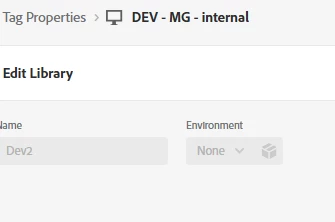
Its not mapped to any environment - that says UI. Is it mapped automatically to Prod env?
 

Best answer by bjoern__koth

Hi ​@Michael_Soprano 

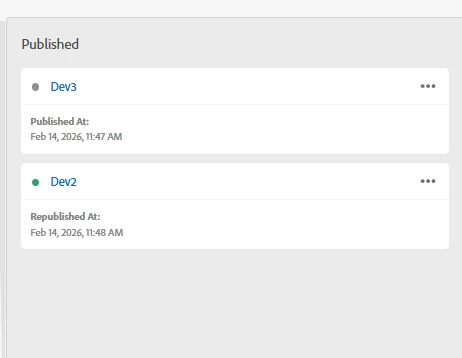
As ​@arpan-garg mentioned, if your change is in the prod column, it has been pushed.

The green dot indicates which version is currently live. Since you republished the previous change, the green is on the second item in your list.

3 replies

arpan-garg
Community Advisor
Community Advisor
February 16, 2026

Hi ​@Michael_Soprano  - If you Dev2 library already on the column of production environment, this means it is already published there.

bjoern__koth
Community Advisor and Adobe Champion
bjoern__kothCommunity Advisor and Adobe ChampionAccepted solution
Community Advisor and Adobe Champion
February 16, 2026

Hi ​@Michael_Soprano 

As ​@arpan-garg mentioned, if your change is in the prod column, it has been pushed.

The green dot indicates which version is currently live. Since you republished the previous change, the green is on the second item in your list.

Cheers from Switzerland!
AmitVishwakarma
Community Advisor
Community Advisor
February 20, 2026

Hi ​@Michael_Soprano ,
If the library is shown in the Production / Published column, it is already mapped to and built for the Production environment. That’s exactly what the Prod column means.

The green dot marks which of those published libraries is the one currently live in Production; older ones in the list are just previous Prod builds you can republish/rollback to. The “Environment: None” label in the library details screen doesn’t change that – environment assignment for Prod is controlled by the publishing flow/column, not that dropdown.

Thanks,
Amit

Amit Vishwakarma - Adobe Commerce Champion 2025 | 16x Adobe certified | 4x Adobe SME