
How to set up schema and dataset with one to many relationship | Community
Skip to main content
Level 4
January 27, 2026
Solved

How to set up schema and dataset with one to many relationship

  • January 27, 2026
  • 1 reply
  • 37 views

We have a customer dataset and dataflow already set up. The data structure is set up to accommodate a one to one key-value pair; one key and one value such as gender (key) = male (value). We are looking to ingest data into RTCDP with a one-to-many relationship; i.e. one key with multiple values.

Sample use case:

We want to set up a key called “Products held”. There is no set number of products held for each customer. A customer could have 1 product held, or 10 or up to 100; it’s different for each customer.

E.g.

Customer001: products_held = product1; he has a single product held.

Customer002: products_held = product5, product15, product23…and so on; he has 16 products held.

Customer003: products_held = product4, product18, product30…and so on; he has 50 products held.

I assume that we will need a new schema for this and perhaps a new dataset. Please advise as to how this can be set up. If there is documentation on this, please let me know.

Thanks!
Best answer by Harveer_SinghGi1

Hi ​@m_alcantara ,

I think what you need is an XDM field of type String Array (String[]) which can hold multiple values for a given key.

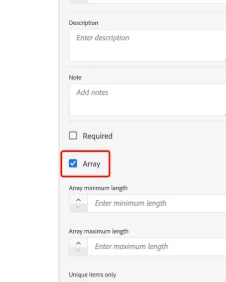
If the field products_held is not already create in your existing schema you can simply add it with data type selected as string and check the array checkbox at the bottom of field configuration as shown below,


If this field already exists in your schema with a different data type and it is already collecting data then you’ll have to delete the dataset (and probably the field also if it is participating in union schema) and then setup the field again using same steps as above.

Cheers!

1 reply

Harveer_SinghGi1
Community Advisor and Adobe Champion
Harveer_SinghGi1Community Advisor and Adobe ChampionAccepted solution
Community Advisor and Adobe Champion
February 4, 2026

Hi ​@m_alcantara ,

I think what you need is an XDM field of type String Array (String[]) which can hold multiple values for a given key.

If the field products_held is not already create in your existing schema you can simply add it with data type selected as string and check the array checkbox at the bottom of field configuration as shown below,


If this field already exists in your schema with a different data type and it is already collecting data then you’ll have to delete the dataset (and probably the field also if it is participating in union schema) and then setup the field again using same steps as above.

Cheers!

Level 4
February 5, 2026

Hello Harveer,

Thank you. Is the recommended approach to use our existing dataset and dataflow, and edit the schema, dataset and dataflow by adding the String array (for instance, add products_held as the string array), then populate that field with all the values? To confirm, is there no limitation on how many values are in that string array data type? Can a hundred values be added, e.g. product1 to product100?

Regards,

Michael

Harveer_SinghGi1
Community Advisor and Adobe Champion
February 6, 2026

Hi Michael,

If the XDM path for this field does not exist already (or you are okay with creating this field using a different path if the field already exists) you can add to the schema as it will help you keep your historical data, you don’t need to delete the dataset in this case.

If the XDM path you wish to use for this field is already created in the schema with a different data type, then you’ll have to delete the dataset(s) collecting data for this field and then update the data type of the field.

On the number of values in a string array, there is no limit to how many values you can add but there are data ingestion limit in AEP and CJA that you’ll have to consider as adding huge no. of values is going to increase the event size and that may reach the data ingestion limits of AEP and/or CJA. These are the documented events sizes for AEP and CJA,

  • AEP:: For streaming sources the maximum record size is 1 MB, with the recommended size being 10 KB.
  • CJA: Average size is 2 kilobytes per row of data ingested into Customer Journey Analytics. This is a soft limit which means you can ingested events of larger size but you may experience performance degradation and latency.

As long as you stay within these limits you can add as many values to string array as you want.

Cheers!