The predefined order of PDF files is not respected when combining these via the API | Community
Skip to main content
New Member
November 6, 2025
Question

The predefined order of PDF files is not respected when combining these via the API

  • November 6, 2025
  • 1 reply
  • 84 views

Field DescriptionWhat product are you using?What area of the product are you using?What are you trying to achieve?What’s the problem or error?What have you tried so far?Environment / VersionScreenshots / Videos / Logs / Code

Adobe.PDFServicesSDK
Combining PDF Files
combining multiple pdf files (in a certain order) into 1 single PDF file
the resulting combined pdf file does not respect the order in which I added the pdf files
debugging my source-code and checking on right order of the files in the collection before adding these files into the builder.AddAsset collection of Adobe
Microsoft.NET / Adobe.PDFServicesSDK 4.1.0


1 reply

AmitVishwakarma
Community Advisor
Community Advisor
March 5, 2026

Hi ​@StevenDerveauxKorian ,

PDF Services combines files in the exact order you pass them to the combine operation – there is no extra sorting on the service side. If the output order is wrong, it’s almost always due to how the assets list is built in your code, not the API itself.

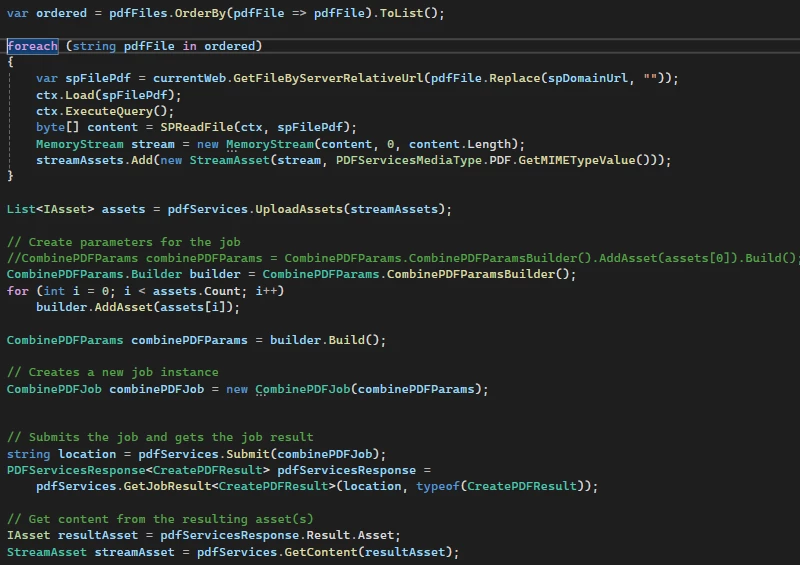
In your screenshot you do:

List<IAsset> assets = pdfServices.UploadAssets(streamAssets);

var builder = CombinePDFParams.CombinePDFParamsBuilder();
for (int i = 0; i < assets.Count; i++)
builder.AddAsset(assets[i]);

Two key points:

  • Don’t assume UploadAssets(streamAssets) returns assets in the same order as streamAssets. The SDK doesn’t promise that; treat that list as unordered.
  • To guarantee order, either:
    • Upload and add in the same loop, in your desired sequence:
      var builder = CombinePDFParams.CombinePDFParamsBuilder();

      foreach (var streamAsset in orderedStreamAssets) // already in your desired order
      {
      IAsset asset = pdfServices.UploadAsset(streamAsset);
      builder.AddAsset(asset); // order is now exactly this loop order
      }

      var combineParams = builder.Build();
    • Or keep your own mapping { originalIndex -> asset } and sort by that before calling AddAsset.
  • As long as you call builder.AddAsset in the order you want, the combined PDF will follow that order, same as the standard Combine Files examples in the docs where order is defined by the sequence of added inputs https://experienceleague.adobe.com/en/docs/acrobat-services-learn/tutorials/usecases/employeeonboarding
Amit Vishwakarma - Adobe Commerce Champion 2025 | 16x Adobe certified | 4x Adobe SME