not able to get handle for doc uploading | Community
Skip to main content
February 14, 2025
Question

not able to get handle for doc uploading
  • February 14, 2025
  • 2 replies
  • 532 views

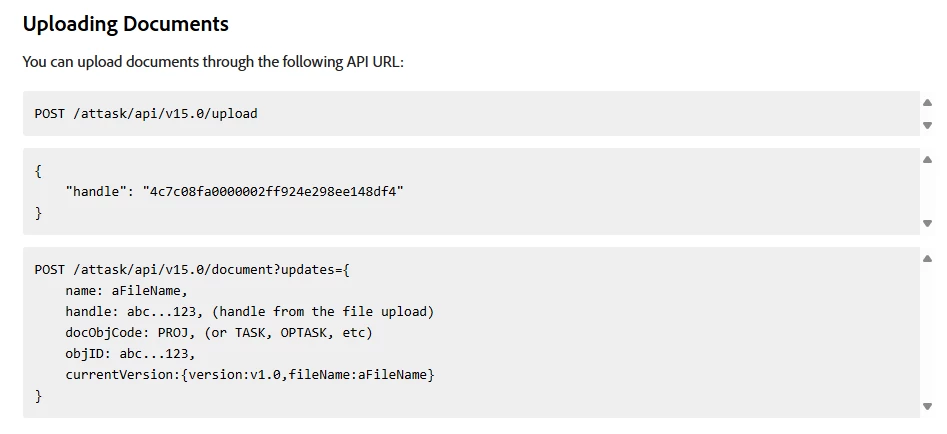
I'm trying to use python to upload a file to workfront, according to the userguide, I should get a 'handle' when I sent a post request to /attask/api/v15.0/upload, but I only got a response 401 "com.attask.common.AuthenticationException". I found "uploadedFile" is necessary for the request, I tried but still return 401. could anyone help to provide a python example of how to upload a file? MANY THANKS!!!!


Here is the code I used. 

dest = self.domain_url+'/attask/api/upload'

params['uploadedFile'] = filename

files = [('uploadedFile', open(filename,'rb'))]
response = requests.post(dest, data = params, files = files)

This post is no longer active and is closed to new replies. Need help? Start a new post to ask your question.

2 replies

Adobe Employee
February 18, 2025

Hello AdminUs6.  Thanks for posting the problem you're facing.


I could be wrong, but the error you are seeing (with a 401 and AuthenticationException) is likely not related to the parameters for `uploadedFile` and such, but more related to how you're authenticating your request.


Here is the documentation that describes your authentication options: https://experienceleague.adobe.com/en/docs/workfront/using/adobe-workfront-api/api-general-information/api-basics#authentication.


If the problems were specific to your upload parameters and such, then you would be getting a 403 error.  As it's a 401, I don't think it's specific to uploading files, as much as it is about how you're authenticating your request.


In order to better help you debug this problem, please provide details about how you are currently authenticating your request.  Please don't send anything confidential, as this is a public forum, but describe the headers and/or query parameters you are sending.


Also, in the response headers, there is a request ID.  Including that would be helpful for more debugging on our end.


If you want to open up a customer issue, you can also visit this page: https://experienceleague.adobe.com/en/docs/workfront/using/basics/tips-tricks-for-basics/contact-customer-support.


Thanks.

eautoaccess
Level 2
February 20, 2025

It looks like you're running into an authentication issue with the 401 error. That typically means the API isn’t recognizing your credentials. You’ll need to make sure you're sending the correct authentication headers (usually an API key or OAuth token) with your request.

Here’s a basic example with authentication headers:

python
Copy
Edit
import requests

url = "https://yourdomain.attask-api.com/attask/api/v15.0/upload"
headers = {
"Authorization": "Bearer YOUR_ACCESS_TOKEN"
}
params = {
'uploadedFile': 'filename'
}

files = {'uploadedFile': open('filename', 'rb')}
response = requests.post(url, headers=headers, params=params, files=files)

if response.status_code == 200:
print("File uploaded successfully!")
else:
print(f"Error: {response.status_code} - {response.text}")
Make sure you replace YOUR_ACCESS_TOKEN with your actual token and adjust the domain URL if needed. If you still get a 401, double-check your API token and permissions in Workfront.