
How to correctly grant developer access to teammate for developer console? | Community
Skip to main content
sarav_prakash
Community Advisor
Community Advisor
January 15, 2025
Solved

How to correctly grant developer access to teammate for developer console?

  • January 15, 2025
  • 1 reply
  • 988 views

Hi, 

I am System administrator for my Org. I am trying to grant developer access to console, but developer is not able to login to console successfully.

 

Everytime he sees User login only 
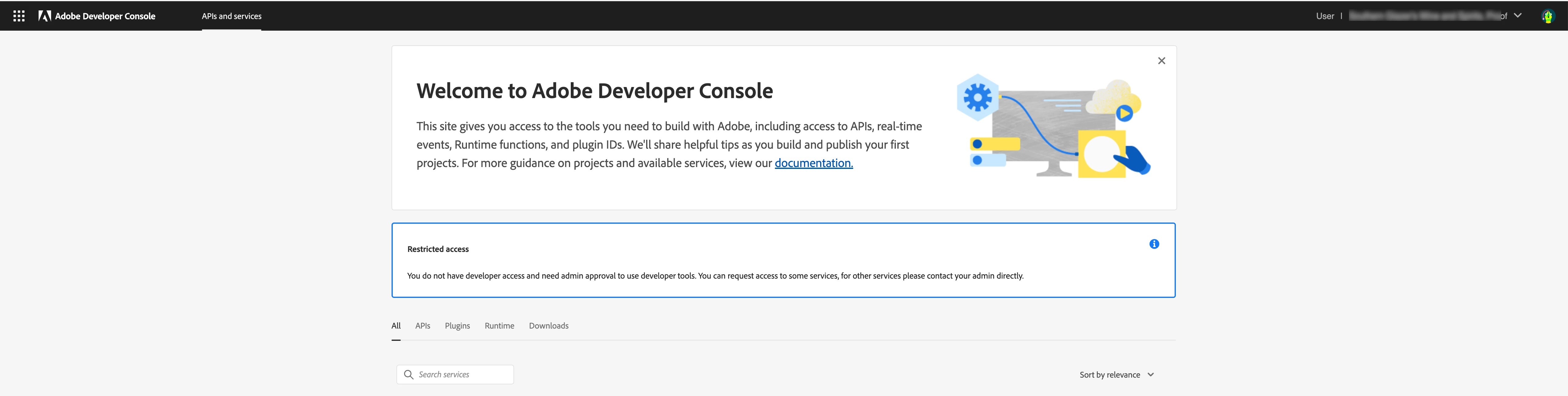
 

Can you please point correct Products to assign from adminconsole to grant developer access. 


This post is no longer active and is closed to new replies. Need help? Start a new post to ask your question.
Best answer by sarav_prakash

Thanks Manik, I figured. I was missing the Profile against the Appbuilder product. Upon adding the Profile to the Product and THEN adding the developer, it worked. Thanks for quick reply. This is resolved now. 

1 reply

tmj
Adobe Employee
Adobe Employee
January 15, 2025

Hey @sarav_prakash , 


You can add a developer by following the steps below - 

  1. Go to Admin Console https://adminconsole.adobe.com
  2. Click on Add Developer
  3. Enter their email address
  4. Click on + to select products
  5. Select product from the list
  6. Select product profile
  7. Save


Hope this helps

Thanks
Manik


sarav_prakash
Community Advisor
sarav_prakashCommunity AdvisorAuthorAccepted solution
Community Advisor
January 15, 2025

Thanks Manik, I figured. I was missing the Profile against the Appbuilder product. Upon adding the Profile to the Product and THEN adding the developer, it worked. Thanks for quick reply. This is resolved now.