Cannot initiate login: says Company or School Account not supported | Community
Skip to main content
Level 2
July 1, 2020
Solved

Cannot initiate login: says Company or School Account not supported

  • July 1, 2020
  • 6 replies
  • 5044 views

Hi,


I recently received my Project Firefly access, did the Console I/O integration and setup the npm libs.


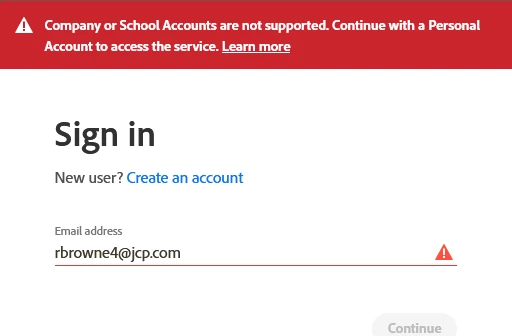
But when I try to run "aio login", open the access page, and try to login in it tells me that my account is not supported - it tells me "Company or school accounts are not supported. continue with a personal account."


My account is linked to my org with a federated login backed by okta.


I really fail to see the point of the personal account, because in that case I wouldn't have access to the data I need. Any ideas? 


This post is no longer active and is closed to new replies. Need help? Start a new post to ask your question.
Best answer by duynguyen_adobe

Hi @rbrowne_jcp1 , the issue has been fixed and deployed. Please make sure you have the latest AIO CLI (uninstall and re-install it with `npm install -g @adobe/aio-cli`).

Then, `aio login` with your company account should be working now.

6 replies

Adobe Employee
July 2, 2020
Hi - our team is looking into the issue and will update here.
Level 2
July 3, 2020
Hi, thanks for the response. No change so far, still cannot login. Please do let me know once this is fixed.
Level 2
July 7, 2020
hi, any updates on this? I have some free time now to build this out. So would really appreciate a resolution to this issue. Thanks.
sarahxxu
Adobe Employee
Adobe Employee
July 7, 2020
Hi @rbrowne_jcp1 we are working on this issue currently! You can tract the progress here. https://github.com/adobe/aio-cli-plugin-auth/issues/49 Our apologies for the belated response -- Adobe was in shutdown last week so we are just coming back to work.
duynguyen_adobeAdobe EmployeeAccepted solution
Adobe Employee
July 8, 2020

Hi @rbrowne_jcp1 , the issue has been fixed and deployed. Please make sure you have the latest AIO CLI (uninstall and re-install it with `npm install -g @adobe/aio-cli`).

Then, `aio login` with your company account should be working now.

Level 2
July 8, 2020
thank you so much @duynguyen_adobe works now... really appreciate the response
Level 2
July 8, 2020
thanks @sarahxxu for the update... wasn't aware of the break.... thank you