AEM Guides Native PDF : New templates are not visible while generating PDF | Community
Skip to main content
Level 2
August 22, 2023
Solved

AEM Guides Native PDF : New templates are not visible while generating PDF

  • August 22, 2023
  • 2 replies
  • 1412 views

Hi Team,


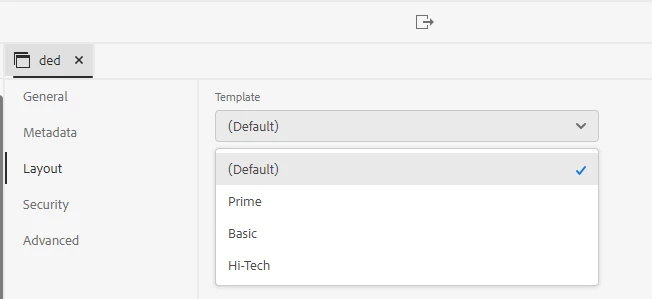
AEM Guides Native PDF : New templates are not visible while generating PDF.

Created a new template by duplicating default pdf templates. I followed below documentation link. Followed all steps and copied as suggested in the link. But while generating Native PDF unable to view new templates for selection. I can see only Basic, Prime, and Hi-Tech templates. Can someone please through some light on this?


https://experienceleague.adobe.com/docs/experience-manager-guides-learn/tutorials/install-guide/on-prem-ig/output-gen-config/config-native-pdf-publish/pdf-template.html?lang=en#


This post is no longer active and is closed to new replies. Need help? Start a new post to ask your question.
Best answer by kirtio39524002

Go to Tools -> Guides -> folder Profile -> global Profile -> templates -> PDF section add your template and save

then it will start picking up in Layouts 

2 replies

partyush
Community Advisor
Community Advisor
August 25, 2023

Hi @pchinta 


I totally get how it can be a head-scratcher when your new templates aren't showing up in AEM Guides for generating Native PDFs.


Let's see if these pointer can troubleshoot you issue : 

  1. Path: Check that you've placed your new templates exactly where they need to be. Sometimes it's like misplacing a puzzle piece – it just won't fit unless it's in the right spot.

  2. Detail: Take a second look at the instructions you followed. It's like following a recipe; even a small oversight can change the outcome. Make sure you've covered all the steps, no shortcuts.

  3. The Cache : Sometimes computers act like stubborn elephants, remembering things even after you've changed them. Clear the cache and re-index the content – it's like giving your computer a fresh pair of glasses to see your new templates.

  4. Hit that Publish Button: If your templates were created after your last publish, they might be sulking in the corner. Give them some spotlight by republishing your content.

  5. Permission: Check if the templates are playing hard to get due to permission issues. It's like needing the right badge to enter a party. Make sure you're on the list.

  6. Turn it Off and On Again: Yep, that's a classic. Sometimes a good ol' restart of AEM can do wonders. It's like a mini-vacation for your system.

  7. Log: Dive into the logs – they're like breadcrumbs that can lead you to the culprit. Any error messages might give away what's causing the templates to play hide-and-seek.

Thanks

kirtio39524002Accepted solution
March 7, 2024

Go to Tools -> Guides -> folder Profile -> global Profile -> templates -> PDF section add your template and save

then it will start picking up in Layouts 

pchintaAuthor
Level 2
March 7, 2024

Yeah, this is right. I forgot to update this. I got the answer.