Unable to use URL in AEP Audience Manager | Community
Skip to main content
February 4, 2025
Solved

Unable to use URL in AEP Audience Manager

  • February 4, 2025
  • 1 reply
  • 1167 views

Hi,


When I try to create an audience in AEP audience manager, it appears I cannot leverage on the OOTB Page URL dimension (xdm.web.webPageDetails.URL). The only available URL attribute in Audience Manager is the web referrer URL (see screenshot). 

Is there a way I can create an audience based on the page URL the user visited on our site? Thanks!
 

This post is no longer active and is closed to new replies. Need help? Start a new post to ask your question.
Best answer by Harveer_SinghGi1

HI @winnieho ,

It looks like either the field is not created in any of the ExperienceEvent schemas, schema containing this field is not enabled for profile or the field does not have any data. Please check these things,

  • Check the ExperienceEvent schemas containing the field and make sure it is enabled for profile. Attributes in Audience builder are available from profile enabled schemas only
  • Does this field show up for XDM ExperienceEvent class in Union Schemas UI? If it doesn't, this means this field is not created in any of the ExperienceEvent schemas. You can add the field to your schema and it should be available for use in audience builder after that.
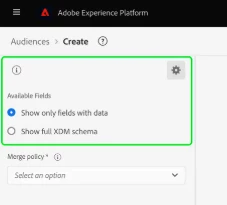
  • If the field is available in Union schema, then in the Audience builder choose the Show full XDM schema option in Available Fields and see if the field starts to show up,

Cheers!

1 reply

Harveer_SinghGi1
Community Advisor
Harveer_SinghGi1Community AdvisorAccepted solution
Community Advisor
February 6, 2025

HI @winnieho ,

It looks like either the field is not created in any of the ExperienceEvent schemas, schema containing this field is not enabled for profile or the field does not have any data. Please check these things,

  • Check the ExperienceEvent schemas containing the field and make sure it is enabled for profile. Attributes in Audience builder are available from profile enabled schemas only
  • Does this field show up for XDM ExperienceEvent class in Union Schemas UI? If it doesn't, this means this field is not created in any of the ExperienceEvent schemas. You can add the field to your schema and it should be available for use in audience builder after that.
  • If the field is available in Union schema, then in the Audience builder choose the Show full XDM schema option in Available Fields and see if the field starts to show up,

Cheers!