Sending Segment Data to Google Ads Remarketing Lists | Community
Skip to main content
Level 3
October 16, 2023
Solved

Sending Segment Data to Google Ads Remarketing Lists

  • October 16, 2023
  • 1 reply
  • 3857 views

Hi there,

So I followed the steps outlined in this guide (https://experienceleague.adobe.com/docs/audience-manager/user-guide/implementation-integration-guides/integrating-third-party/rlsa-integration.html?lang=en) and I just had a few questions about what I have set up.
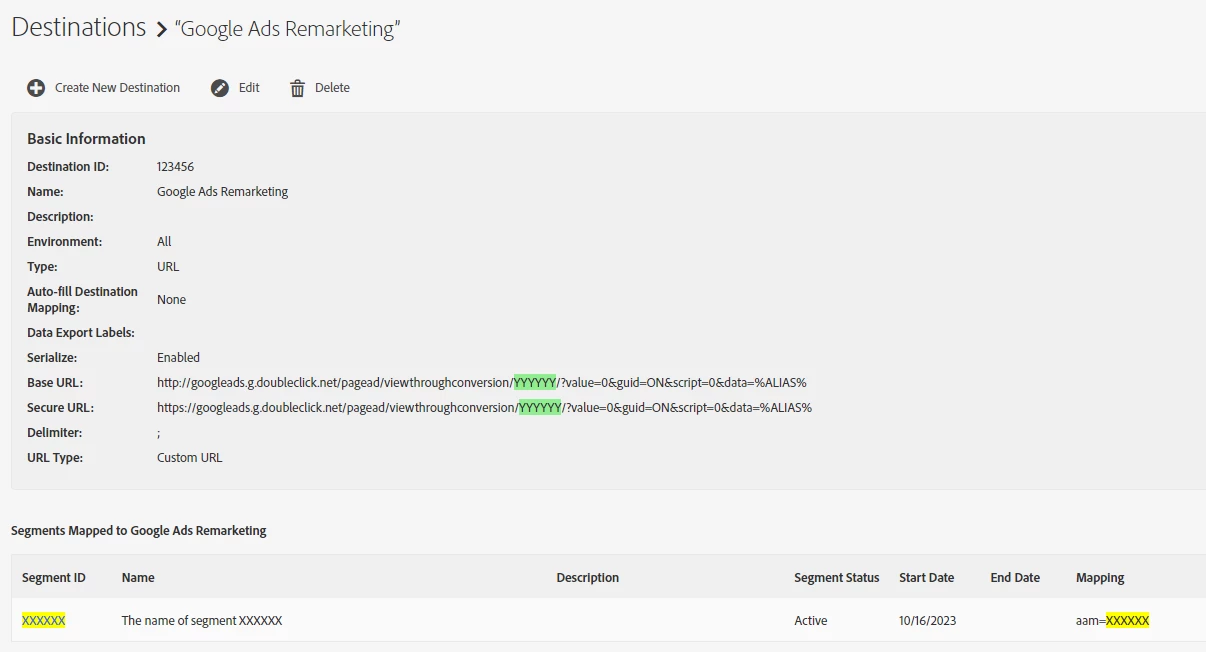


Note:

YYYYYY is the value of the google conversion ID in AdWords

XXXXXX is the segment id in audience manager


Questions:

1. Is the syntax in the mapping cell (aam=XXXXXX) correct?

2. Does the rest of my destination config look correct?

3. What actually gets shared with AdWords through this process of mapping segment XXXXXX to AdWords and Is there an example of the data and its format that I can refer to? 


Thank you in advance,


Michael

This post is no longer active and is closed to new replies. Need help? Start a new post to ask your question.
Best answer by Tof_Jossic

@michaelwills 


Question 1 - Correct


Question 2 - Correct


Question 3 - As I recall this is mostly based on an ID Sync taking place between AAM and Google (note this has to be enabled by the Support team on the AAM instance) so whenever there is a match, Google will know the corresponding partner UID that can be targeted offsite

1 reply

Tof_Jossic
Adobe Employee
Tof_JossicAdobe EmployeeAccepted solution
Adobe Employee
October 17, 2023

@michaelwills 


Question 1 - Correct


Question 2 - Correct


Question 3 - As I recall this is mostly based on an ID Sync taking place between AAM and Google (note this has to be enabled by the Support team on the AAM instance) so whenever there is a match, Google will know the corresponding partner UID that can be targeted offsite

Adobe Employee
October 17, 2023

@michaelwills 

Christophe is correct on question 3; the actual ID sent to Google will be the Audience Manager device ID. A Google ID sync is required to ensure Google is able to target this ID. A case can be submitted to customer care to inquire whether the Google ID sync is enabled for your specific AAM instance.


For more context, the URL request configured in the destination contains most of the actual data which is sent to Google:


//googleads.g.doubleclick.net/pagead/viewthroughconversion/xxxxxxxx/?value=0&guid=ON&script=0&data=%ALIAS%


The %ALIAS% is replaced with the specific segment qualifications for that particular user firing the request. XXXXXX, as you mentioned, specifies the actual Google account (conversion ID) which the data is activated to. The device ID is included based on the demdex cookie from the user's browser session. 

As this destination relies on real-time data transfers, it will take time for the audience population to grow on Google's side. Each audience should be available for retargeting in Google once ~100 users navigate to the page, qualify for the specific audience, and therefore fire the request to Google.  

Level 3
October 23, 2023

Thanks both @tof_jossic and @curtiso1.


I reached out to Adobe to get Google ID sync enabled, which they did. I was able to validate that it was functioning by loading our site up in incognito, ensuring that "Block third-party cookies" is disabled, and then looking for a request with '771' in it. 


Am I right to assume it is the dpuuid (unique device id) value in this request that Google will ultimately use for targeting?


Also - this article (https://experienceleague.adobe.com/docs/audience-manager/user-guide/reference/cid.html?lang=en) suggests that dpuuid is deprecated and that my code should be updated. Wondering which code and where? Would it potentially be the 'custom library code' that I have in the Adobe Analytics extension in Adobe Tags? Many thanks.