Level 2
May 21, 2021 7:43 AM UTC
Solved

How do I move a folder to an other folder?

Hello,


I am reorganizing my folder structure.

Therefore I want to move folders, containing traits or segments, to an other (new) folder.

How do I do this?

This post is no longer active and is closed to new replies. Need help? Start a new post to ask your question.
Rachit_Sachdev
Rachit_SachdevAccepted solution
Level 2
May 21, 2021 8:56 AM UTC

Hi @pietervankerckhoven ,


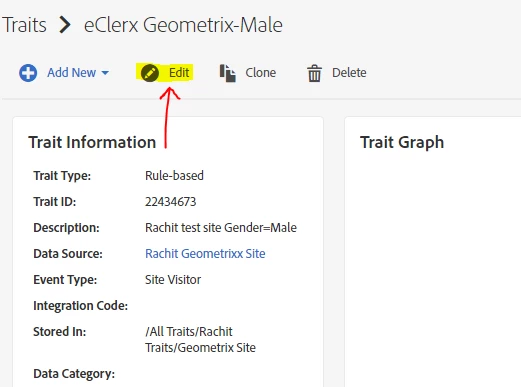
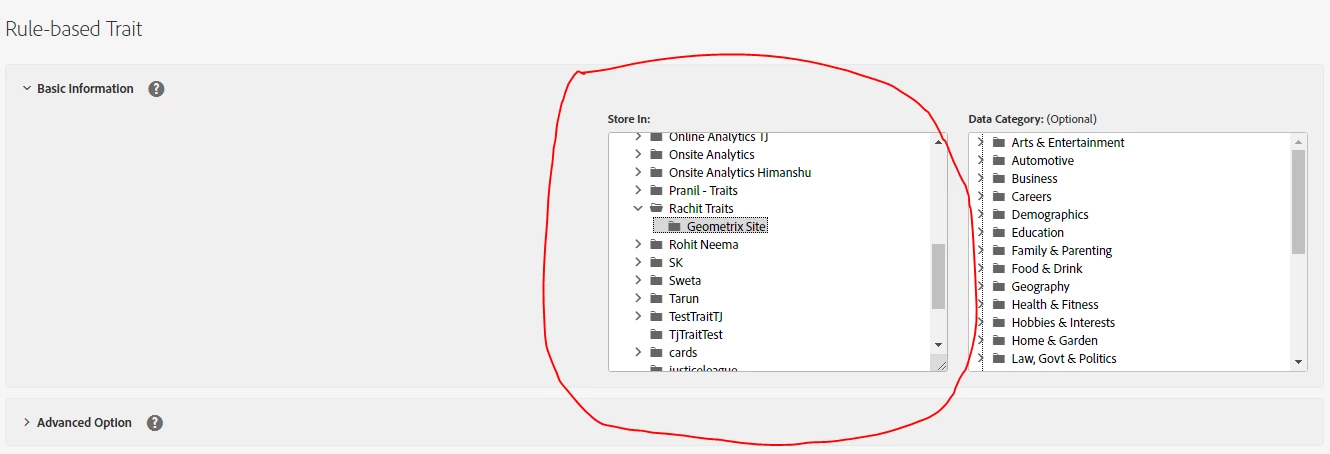
You can move the traits/segments from one folder to another by editing the Trait/segment and choosing the new location of your Trait/segment.


Auto created Traits from Analytics will not be allowed to be changed as they are system generated.


Thanks,

Rachit Sachdev

3 replies

Rachit_Sachdev
Rachit_SachdevAccepted solution
Level 2
May 21, 2021 8:56 AM UTC

Hi @pietervankerckhoven ,


You can move the traits/segments from one folder to another by editing the Trait/segment and choosing the new location of your Trait/segment.


Auto created Traits from Analytics will not be allowed to be changed as they are system generated.


Thanks,

Rachit Sachdev

Translate
Level 3
Jun 15, 2021 11:19 AM UTC
hi, you can use bulk tools to reorganise the folder structure (you can move whole folders themselves, as well as moving traits from one folder to another) https://experienceleague.adobe.com/docs/audience-manager/user-guide/reference/bulk-management-tools/bulk-management-intro.html?lang=en
Translate
Level 2
Jun 28, 2021 8:52 AM UTC

Using BAAAM you just update by editing the parent folder and run an update. Only beneficial in a cost/benefit perspective to use BAAAM if you are aiming for moving a lot. Else it would be time efficient to just edit/move in the AAM UI. 

Translate