Folders have been deleted, but my segments were built on the folder ID. Will the segments change | Community
Skip to main content
Level 2
February 6, 2019
Solved

Folders have been deleted, but my segments were built on the folder ID. Will the segments change

  • February 6, 2019
  • 3 replies
  • 2652 views

I have many segments in AAM were built on folder IDs. But for some reasons, I need to delete most of the folders. Really want to know if the traits under my segments will be gone after my deletion of the folders?

This post is no longer active and is closed to new replies. Need help? Start a new post to ask your question.
Best answer by Tof_Jossic

QuinnyLi​ my understanding is that if you have segments using folder traits in their rules, then you should not be able to delete the folders. See below:

Delete a Folder Trait

I tried to test with one folder trait containing 1 trait (trait A):

- Created a segment that includes the folder trait

- Then moved the Trait A to another folder

- Then tried deleting the folder trait

- I get blocked with the following message
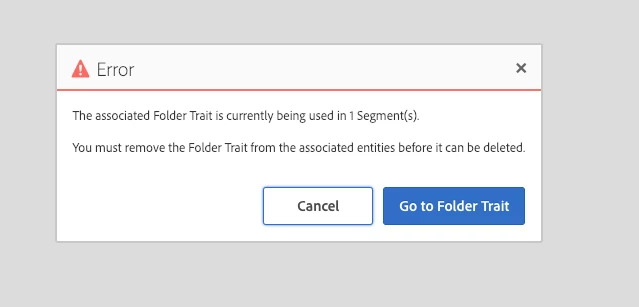
So at this point despite the folder trait no longer having Trait A in its ranks, you are not able to delete it because it is still linked to the segment rule. To get proper result after you have moved your traits to other folders, you would need to either add the specific traits to the segment rule or change the folder trait to the one they have been moved to.

Apologies if this sounds confusing but hopefully it sheds a bit more light on what is or is not possible in this configuration.

3 replies

Tof_Jossic
Adobe Employee
Adobe Employee
February 6, 2019

quinnyli​ I don't believe you will be able to delete the folders if they contain traits, see screenshot:

QuinnyLiAuthor
Level 2
February 6, 2019

Thank you so much for you reply. I really appreciated this.

I moved the traits to another above level folder, so that I deleted the folders. Since a lot of my segments are built by folder traits. I am wondering if all the traits will disappear from my segment?

Your answer is very appreciated.

Thanks,

Quinny

Tof_Jossic
Adobe Employee
Tof_JossicAdobe EmployeeAccepted solution
Adobe Employee
February 7, 2019

QuinnyLi​ my understanding is that if you have segments using folder traits in their rules, then you should not be able to delete the folders. See below:

Delete a Folder Trait

I tried to test with one folder trait containing 1 trait (trait A):

- Created a segment that includes the folder trait

- Then moved the Trait A to another folder

- Then tried deleting the folder trait

- I get blocked with the following message

So at this point despite the folder trait no longer having Trait A in its ranks, you are not able to delete it because it is still linked to the segment rule. To get proper result after you have moved your traits to other folders, you would need to either add the specific traits to the segment rule or change the folder trait to the one they have been moved to.

Apologies if this sounds confusing but hopefully it sheds a bit more light on what is or is not possible in this configuration.