
Jignesh_Bhate
Level 3
Sep 27, 2017 4:30 AM UTC
Solved

Enable server side forwarding in the Analytics Admin UI (Report Suite Settings > General > Server Side Forwarding)

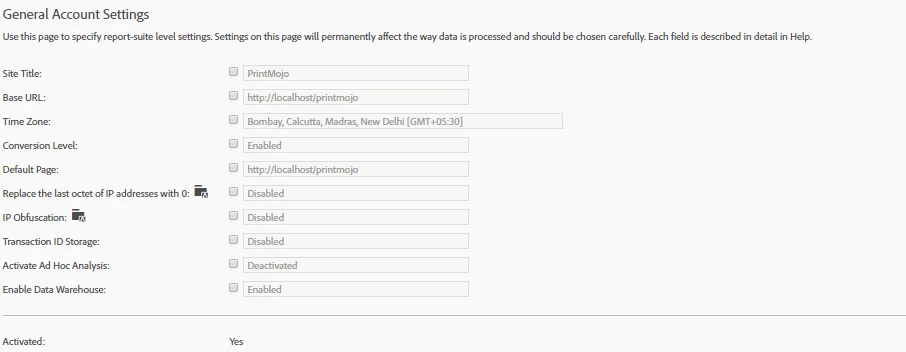
Where do you see this option in Analytics Admin UI under Report Suite Settings -> General? Unable to find it. Server-Side Forwarding says one needs to enable this for AA data to move into AM

This post is no longer active and is closed to new replies. Need help? Start a new post to ask your question.
Varun_Kalra
Varun_KalraAccepted solution
Level 9
Sep 27, 2017 12:24 PM UTC

Hi Jignesh,

Could you raise a support ticket with client care if this is urgent for you to enable Server Side forwarding.

Contact and support information for Adobe Marketing Cloud.

AAM client care or your AAM consultant can enable Server Side forwarding from back end as well for your Experience Cloud Org to enable sending of data from AA to AAM.

Thanks,

Varun Kalra

2 replies

Varun_Kalra
Varun_KalraAccepted solution
Level 9
Sep 27, 2017 12:24 PM UTC

Hi Jignesh,

Could you raise a support ticket with client care if this is urgent for you to enable Server Side forwarding.

Contact and support information for Adobe Marketing Cloud.

AAM client care or your AAM consultant can enable Server Side forwarding from back end as well for your Experience Cloud Org to enable sending of data from AA to AAM.

Thanks,

Varun Kalra

Translate
Gaurang-1
Level 9
Oct 17, 2017 12:01 PM UTC

Hi jigneshb70723694 ,

Is this query resolved?

Thanks,

Gaurang

Translate