Email Impression Tracking Setup with Campaign Classic
I'm brand new to Audience Manager and am trying desperately to figure out how to get my adobe campaign classic to adobe audience manger integration working properly. Right now, I'm focusing on getting our ids to sync between campaign and audience manager.
My current theory is that we need to add a tracking pixel on our email sends so that we can pass in our declared id via an impression or via clicks. Can anyone out there help me validate my setup:
1) My data source is setup as follows:
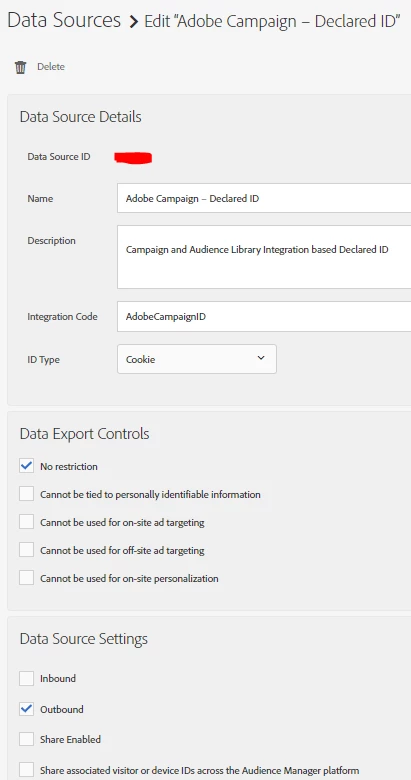
Question #1: This data source was setup by our adobe integration team, but I'm wondering if this should have Inbound, Outbound, Share Enabled, and Share associated visitor or device IDs across the Audience Manager platform selected as well? It seems like if we are passing a declared id, then inbound should be selected. And if we want to be able to share segments back to Adobe Campaign, the other options should be selected. Maybe I'm misunderstanding that though?
1) My impression pixel on my email would be setup as follows:
https://(my-sub-domain).demdex.net/event?d_event=imp&d_cid=(DataSourceID)%01(HashedID)%011&c_emailopen=true&c_campaign=(campaign value)
Question #2: Does this setup look correct for my impression pixel value?