AAM Implementation method | Community
Skip to main content
Level 3
August 10, 2022
Solved

AAM Implementation method

  • August 10, 2022
  • 2 replies
  • 1746 views

Hi,


Right now, we could see application data flows into AAM(confirmed by looking at signals report). But, we would like to stop collecting this application data. What's the best way to confirm how the implementation was done and which code that we need to comment to stop sending the data to AAM. 


FYI - We use Adobe Launch to enable AA. Confirmed in 2 locations to make sure it is not enabled using built in options.

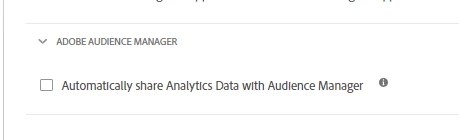
1.  It is not enabled through AA extension(Fig below)
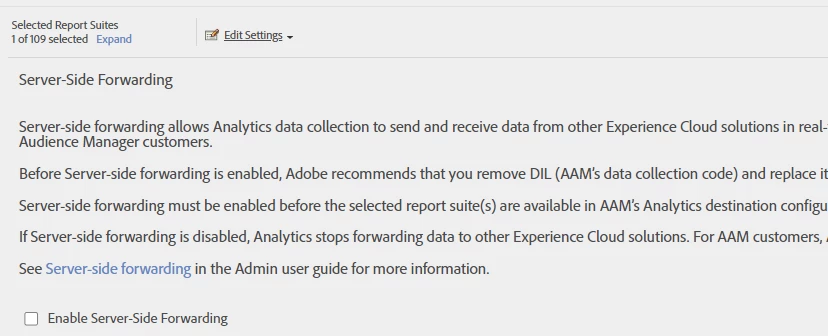
2) It is not enabled through AA Admin console.


This post is no longer active and is closed to new replies. Need help? Start a new post to ask your question.
Best answer by Kishore_Reddy

Hey @ma1985v1 

Two other ways to doublecheck:

  1. See if "Adobe Audience Manager (DIL)" was configured in Adobe Launch
  2. In case Data Integration Library (DIL) code library was deployed your site through Launch rule (instead of an extension) - reference code


In case there are multiple sites, make sure to validate these checkpoints across all of them. Hope this helps.

2 replies

Kishore_Reddy
Community Advisor
Kishore_ReddyCommunity AdvisorAccepted solution
Community Advisor
August 15, 2022

Hey @ma1985v1 

Two other ways to doublecheck:

  1. See if "Adobe Audience Manager (DIL)" was configured in Adobe Launch
  2. In case Data Integration Library (DIL) code library was deployed your site through Launch rule (instead of an extension) - reference code


In case there are multiple sites, make sure to validate these checkpoints across all of them. Hope this helps.

MA1985v1Author
Level 3
August 15, 2022

thanks for the response. I couldnt find DIL code via Adobe Launch or in the application/site level. if we work with Adobe Client care, will they be able to stop receiving this data from the particular application if we couldnt find the code.

Kishore_Reddy
Community Advisor
Community Advisor
August 16, 2022

Yeah, you can work with Adobe Client Care to stop receiving the data.

Please feel free to reopen this thread if you need any additional assistance. Kindly mark my answer as correct if it helps. Thank you.


Adobe Employee
August 20, 2022

@ma1985v1, based on the info you provided. It seems that you have turned off Adobe Analytics server side forwarding. This should prevent data forwarding for that report suite.


In the signals report, you can also check that there aren't any Signals will the key beginning with "c_". All Adobe Analytics forwarded data will start with "c_".


The other sources as mentioned before are DIL(stand-alone JS lib), pixel, typically server side DCS API, Mobile app with AAM methods only.


Another solution can be to request Customer Data Feed exports from customer care. This is a log of every event sent to the AAM servers:

https://experienceleague.adobe.com/docs/audience-manager/user-guide/features/cdf-files.html?lang=en

The referrer may shed some light on other sources collecting data.