

Troubleshooting SFDC Credentials in Marketo Admin
The error below is commonly seen if the password for the SFDC sync user expires, or if you end up having to change the credentials because your sync user left the company. (We recommend you sync user not be an actual person, but that's another article)
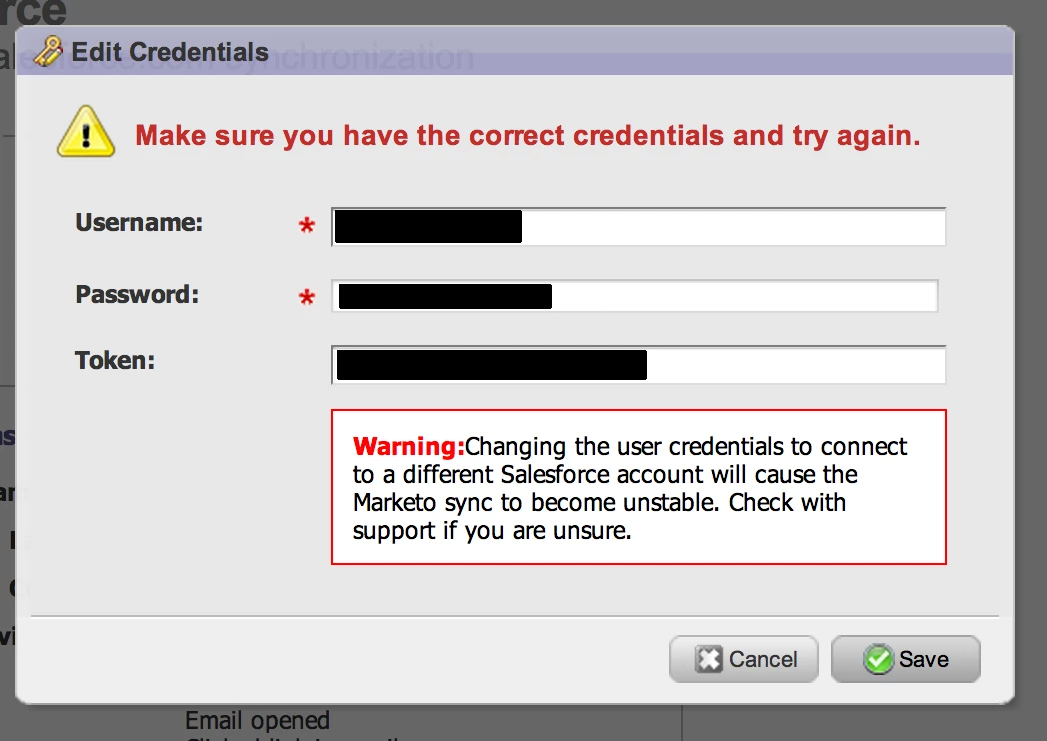
The best way to resolve any issues you may be having with entering your SFDC credentials in Marketo is to follow the instructions below. Nine times out of ten this will resolve the issue, but only if you follow them exactly! Also, be aware that if you're entering new credentials they should be for a user in the same instance of SFDC as the old sync user. It's not currently possible to connect your Marketo instance to a second SFDC instance, and trying to enter credentials from a second instance will result in errors and possible trouble for your Marketo instance.
In Marketo:
1) Click the Admin button in the upper right hand side of the Marketo instance.
2) Go to the "Salesforce" section of the tree menu on the left.
3) Click the "Disable Sync" button at the top. This will prevent Marketo from continuously logging into SFDC. (Prevents you from getting locked out while trying to fix this issue)
In SFDC:
1) Log into SFDC with the sync user credentials.(www.Salesforce.com)
2) If you cannot log in (which is most likely the case), then follow the Salesforce reset password link, or have your admin reset this for you.
3) Once you can log into SFDC as the sync user, click "Your Name - Setup - My Personal Information - Reset Security Token". (Disregard the token you get in the reset password emails, you need to reset the token manually, and make sure to save this email!)
NOTE: Don't forget to make sure that your SalesForce Sync User is not locked out of SFDC.
Back in Marketo:
1) Go to Admin - Salesforce - Edit Credentials
2) Make sure you fill each field separately, do not add the security token to the end of the password, make sure it's in it's own field.
3) Click save.
4) Re-enable the sync.
Is this article helpful ?