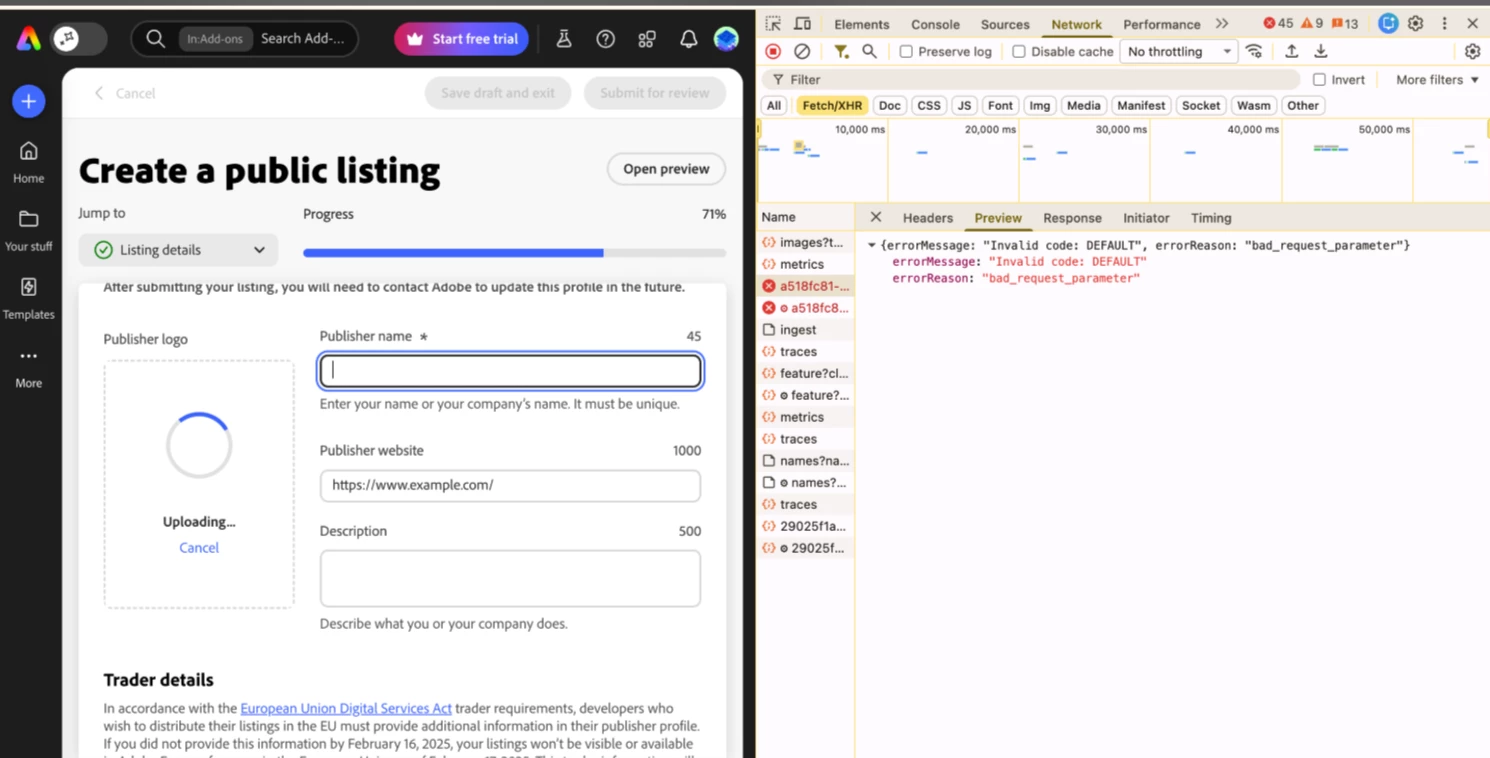
Cannot upload 250x250px Publisher Logo in Add-on Listing Details; returns "bad_request_parameter" error.
Product & version: Adobe Express Developer Console (Web)
Platform: Chrome (Latest version) - Also tested in Incognito and alternative browsers.
Steps to reproduce:
-
Navigate to the Add-on Submission portal and go to the "Listing details" > "Publisher profile" section.
-
Fill out all required text fields (Publisher Name, Website, Description).
-
Try to upload a valid 250x250px image (tested both PNG and JPEG formats, under 1MB, with a simple filename like
logo.png) into the "Publisher logo" drag-and-drop box. -
Observe that the file fails to upload.
-
Open the browser's Developer Tools > Network tab and observe the failed API request returning the following JSON error:
{"errorMessage": "Invalid code: DEFAULT", "errorReason": "bad_request_parameter"}.
Expected result: The 250x250px image should upload successfully, attach to the Publisher profile, and allow the submission process to continue.
Actual result: The upload is rejected by the backend server with a "bad_request_parameter" error, completely blocking the publisher from completing their add-on submission.
Attachments: